> For the complete documentation index, see [llms.txt](https://aaronchen.gitbook.io/daq/llms.txt). Markdown versions of documentation pages are available by appending `.md` to page URLs; this page is available as [Markdown](https://aaronchen.gitbook.io/daq/chapter1.md).
# Chapter 1: Baby Steps
As promised, this tutorial on recursion will start with the basics. It's still a new topic, so don't be discouraged if you struggle.
### Recursion problem #1: Step
Imagine a baby that's at point A, and the baby wants to get to point B.
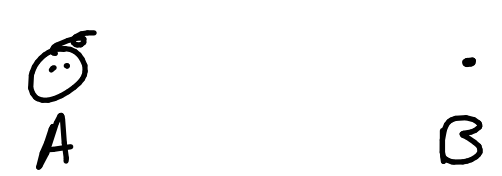
Let's say the baby is around... 3 steps away from point B. For the sake of simplicity,
**Point B = Point A + 3 steps**

Seems manageable so far, right? Let's try to frame this problem in a recursive mindset... and to do that, we'll define a function **step** which aims to take the baby from point A to point B. The function has one parameter, **baby\_location**, which is the baby's current location. (This isn't going to be working code, just a framework for us to think inside of.)
```python
def step(baby_location):
#this doesn't do anything...
```
In computer science, recursion refers to a function that uses itself inside its own definition. So, if we're solving this problem recursively, we're going to have to call **step** inside the definition somewhere. This might seem weird, but lets see what that looks like.
```python
def step(baby_location):
step(baby_location)
```
What happens when we call **step(point\_A)**?
**step** would call itself endlessly; that doesn't seem good! The baby would just stay at point A like so...
```python
step(point_A) -> step(point_A) -> step(point_A) -> step(point_A) -> step(point_A) -> ...
```
However, if you think about it, a function that repeats over and over again is actually really useful for solving problems.
For example, you've seen this before in the form of **while** loops:
```python
#increase x from 0 to 3
x = 0
while x != 3:
x = x + 1
```
This loop repeatedly executes `x = x + 1` until x is 3. What's important about this is that:
1. every time it loops, it gets x closer to 3
2. it stops when x = 3
Going back to **step**, **step** could be useful to us if it had the same properties:
1. Each time we **step**, the baby gets closer to point B
2. The program stops when the baby has reached point B
Let's try it out.
As a reminder, this is our baby:

If we want our baby to get closer to point B, we should probably tell it to take a step closer to point B!

Wow! Now our baby is only 2 steps away from point B! We've successfully allowed the baby to get closer to point B.
Let's represent that in our code:
```python
def step(baby_location):
step(baby_location + 1_step)
```
As a reminder, this code makes no sense in real life, but the idea should be clear. Every time we **step**, we calculate the baby's location if it was one step closer, and then we **step** again with the new location. The parameter, **baby\_location**, comes closer to Point B, step by step.
```python
step(point_A) -> step(point_A + 1_step) -> step(point_A + 1_step + 1_step) -> ...
```
Let's continue **step**ping!

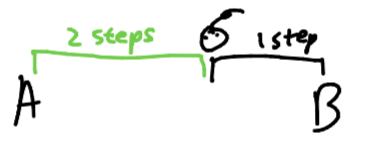
almost there...

He made it!
But with our current code, the baby would keep **step**ping past point B. He's just a baby, he doesn't know when to stop! So, let's tell him when to stop.
```python
def step(baby_location):
if baby_location == point_B:
return
step(baby_location + 1_step)
```
Now, we check first if the baby has reached point B, at which point the function should stop, so we **return.** This time, we don't reach the call to **step** again, so the program ends. And we're done!
If you're still a bit confused, here's a recap to help you understand what's happening:
```python
step(point_A) -> Is baby at point B? NO -> step(point_A + 1_step)
step(point_A + 1_step) -> Is baby at point B? NO -> step((point_A + 1_step) + 1_step) -> step(point_A + 2_step)
step(point_A + 2_step) -> Is baby at point B? NO -> step((point_A + 2_step) + 1_step) -> step(point_A + 3_step)
step(point_A + 3_step) -> Is baby at point B? YES -> return
```
### How is this useful?
You might be thinking to yourself, "Well, sure. I've written a recursive function that moves a baby from point A to point B. How is that ever going to help me?" The answer to that is that the basic ideas behind this function are the exact same for nearly **every** recursive function you will write.
As a reminder, the properties of **step** that allowed us to solve the problem were:
1. Each time we call **step**, the baby gets a little closer to point B
2. The program ends when the baby reaches point B
In fact, if we generalize these two properties, we can use them as a guideline for solving all problems recursively:
1. Each time we call our recursive function, **we make the problem smaller.**
2. When the problem is solved or is small enough to be solvable instantly, **we finish the problem and stop.**
In most kinds of recursion you'll encounter, we make the problem smaller inside the **recursive call**. And when we check if the problem is solved or solvable instantly, we are considering whether any of the **base cases** have been reached. If you can identify these two things, you are well on your way to mastering recursion.